One of the most common sources of confusion in professional print design is the C vs. U suffix on Pantone color codes. Pantone 186 C and Pantone 186 U share the same number — but they look noticeably different when printed. Understanding why, and knowing which to specify, can be the difference between a print job that matches your brand and one that doesn't.
What Do Coated and Uncoated Mean?
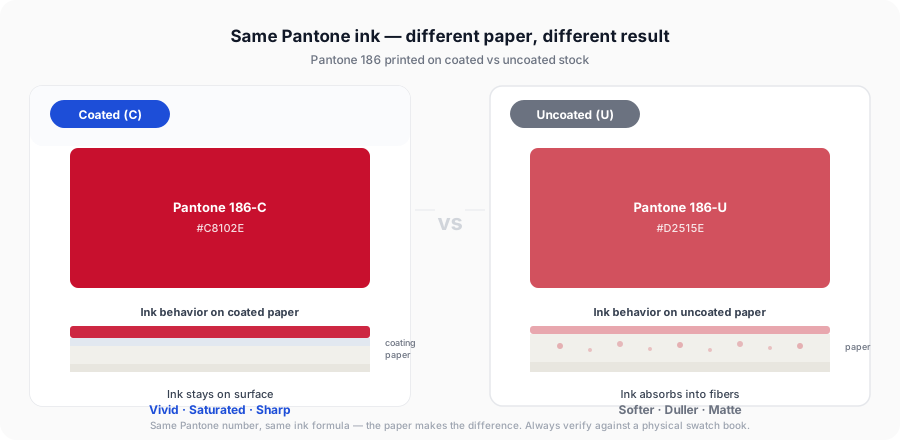
The C and U suffixes refer to the paper stock the color is designed for, not the color formula itself.
Coated (C) paper has a smooth clay-based coating applied to its surface. This coating seals the paper fibers, preventing ink from being absorbed deeply into the stock. The result is that ink sits on top of the paper, producing vivid, saturated, glossy colors.
Uncoated (U) paper has no surface coating. Ink absorbs into the paper fibers, spreading slightly as it's absorbed. The result is that colors appear softer, slightly duller, and more matte compared to the same color on coated stock.
The same ink, different results. Pantone produces the same physical ink formulation for both C and U variants of a color — the difference in appearance comes entirely from the paper, not the ink. The Pantone numbering system accounts for this by publishing separate swatch books for each substrate.
Why Does the Same Pantone Number Look Different?
When ink hits coated paper, it stays near the surface. The smooth coating reflects light evenly, making colors appear bright and saturated.
When ink hits uncoated paper, it absorbs into the fibers and spreads slightly — a phenomenon called dot gain. This absorption dulls the color and shifts its appearance. Ink that looks vivid red on coated stock may look more brick-red or rust-colored on uncoated paper with the same formula.
Pantone's swatch books account for this difference. The Pantone Formula Guide Coated shows how each color looks on coated paper. The Pantone Formula Guide Uncoated shows the same color numbers printed on uncoated stock — and the visual difference between the two books is often striking.
Common Paper Types for Each
Coated Papers
- Gloss coated (high shine, used in magazines and premium brochures)
- Silk/satin coated (subtle sheen, popular for high-end marketing)
- Matte coated (flat finish but still has the surface coating)
- Gloss art board (used for premium packaging)
Uncoated Papers
- Bond paper (standard office paper)
- Laid paper (textured, used for letterheads and stationery)
- Newsprint
- Uncoated card (used for business cards with a natural feel)
- Kraft paper (brown packaging paper)
Matte coated is still coated. Despite its flat finish, matte coated paper has a clay surface coating and should be specified with Pantone C colors, not U. The C/U distinction refers to the presence or absence of surface coating, not the glossiness of the finish.
Which Should You Specify?
The rule is straightforward: match your Pantone suffix to your paper stock.
| Your paper | Specify |
|---|---|
| Gloss coated | Pantone [number] C |
| Silk/satin coated | Pantone [number] C |
| Matte coated | Pantone [number] C |
| Uncoated bond/offset | Pantone [number] U |
| Uncoated card | Pantone [number] U |
| Newsprint | Pantone [number] U |
| Kraft/natural paper | Pantone [number] U |
If you're unsure what paper stock your printer is using, ask them directly before specifying your Pantone colors. This is a standard question any professional printer expects.
What Happens If You Specify the Wrong One?
Specifying C on uncoated paper: Your printer will use the Coated ink formula on uncoated stock. Because the ink absorbs differently than anticipated, the color will appear duller and slightly different than the swatch you approved.
Specifying U on coated paper: The Uncoated ink formula on coated stock will appear more vivid than the uncoated swatch you approved — which may or may not be desirable.
Neither scenario produces a catastrophic result in most cases, but for brand-critical color work where you need to match an approved color precisely, incorrect suffix specification is a common cause of unexpected results.
Coated vs Uncoated in Brand Guidelines
Many brands specify both variants in their brand guidelines to cover all print scenarios:
Brand Red
HEX:     #C8102E
RGB:     200, 16, 46
CMYK:    0, 92, 77, 22
Pantone: 186 C  (for coated paper)
         186 U  (for uncoated paper)
This approach ensures that whether a vendor is printing a glossy brochure or an uncoated letterhead, they have the correct Pantone reference. If your current brand guidelines only specify one variant, consider adding both.
Comparing C and U Versions
When converting a color using our tools, always check both variants. Our CMYK to Pantone and HEX to Pantone converters include a Coated/Uncoated toggle so you can see which colors appear in each library and choose based on your substrate.
For example, converting #C8102E (a strong red):
- Coated result: Pantone 186 C — vivid, saturated red
- Uncoated result: Pantone 186 U — same family, slightly softer appearance when printed
The number is the same, but the visual result on press will differ based on your paper choice. The same goes for the newest codes: you can compare the coated and uncoated versions of the 2026 colors side by side for all 224 additions.
Other Pantone Suffixes You May Encounter
Beyond C and U, Pantone uses additional suffixes for specialized applications:
| Suffix | Meaning |
|---|---|
| C | Coated paper |
| U | Uncoated paper |
| M | Matte coated paper |
| CP | Coated — CMYK process simulation |
| UP | Uncoated — CMYK process simulation |
| EC | Euro-standard coated |
| TC | Textile Cotton (Fashion, Home + Interiors library) |
| X | Used in older Pantone systems, now largely retired |
For most graphic design and commercial print work, you'll only encounter C and U.
A Note on Digital Representations
When you browse Pantone colors on screen — including in our PMS Color Browser — you're seeing RGB approximations of physical inks. The coated and uncoated swatches on screen look similar because your monitor can only display RGB values; it cannot simulate the difference in how ink absorbs into different paper stocks.
This is why physical swatch books remain indispensable. The Pantone Formula Guide Coated + Uncoated set shows both variants printed on their respective papers, making the visual difference immediately apparent.
Explore Pantone by Color Family
Looking for a specific shade? We've compiled comprehensive guides for every major Pantone color family, complete with hex codes, CMYK values, and brand examples:
Pantone Red | Pantone Blue | Pantone Green | Pantone Yellow | Pantone Orange | Pantone Pink | Pantone Purple | Pantone Gold | Pantone Black | Pantone White
Frequently Asked Questions
Related Tools
Convert CMYK values to Pantone with Coated/Uncoated toggle.
Find Pantone matches for any HEX code — filter by Coated or Uncoated.
Browse all Coated, Uncoated, and Metallic Pantone colors.
A complete guide to the Pantone Matching System and PMS colors.
Substrate Changes Everything — Not Just Paper
Coated versus uncoated is really a lesson about substrate, and it does not stop at paper. The same ink, dye or pigment behaves differently on every surface it lands on, which is why so many industries maintain their own colour standards rather than borrowing print's.
Textiles are the clearest example. Pantone publishes an entirely separate library for fashion and interiors, supplied as dyed cotton rather than printed chips, precisely because a colour approved on paper will not reliably come back the same from a dye house — see TCX vs TPX vs TPG for how those formats differ.
Coatings work the same way: gloss level shifts a RAL colour more than the difference between two neighbouring codes, and the same holds for architectural paint — our guide to converting a Pantone colour to paint covers how sheen and room light move a wall colour after the code has been chosen. And when you need to compare across substrates rather than argue about them, the answer is measurement — convert to CIELAB and compare ΔE, or work back from a spectrophotometer reading with LAB to Pantone.