Every color on a digital screen has a HEX code — a six-character identifier like #C8102E that tells your monitor exactly how much red, green, and blue light to emit. But when that color needs to go to print, particularly for brand-critical work, you'll need to find its closest Pantone PMS equivalent.
This guide explains exactly how that conversion works, what its limitations are, and how to get the most accurate result for your print projects.
What Is a HEX Color Code?
A HEX code is a hexadecimal representation of an RGB color. Each pair of characters represents one color channel:
#C8102E
 ^^  → Red:   C8 = 200
   ^^ → Green: 10 = 16
     ^^ → Blue:  2E = 46
So #C8102E is rgb(200, 16, 46) — a deep red. HEX codes are used everywhere in digital design: CSS, Figma, Photoshop, brand guidelines, and design systems.
Shorthand HEX codes like #FFF or #C8E expand to #FFFFFF and #CC88EE. Most Pantone converters accept both formats.
Why You Need to Convert HEX to Pantone
HEX colors exist in RGB color space — designed for screens that emit light. Pantone colors are pre-mixed printing inks — designed for paper that reflects light. These are fundamentally different systems.
When you send a file to a professional printer with only HEX or RGB values, the printer must guess how to translate your screen color into physical ink. This introduces variation. Different printers will produce different results.
Specifying a Pantone color eliminates this guesswork. The printer uses a standardized pre-mixed ink — the same ink, every time, everywhere.
Common scenarios where you need HEX to Pantone:
- Your brand guidelines specify a HEX code but your printer needs a Pantone reference
- You're designing packaging, merchandise, or signage that requires color consistency
- A client sends you a website color and you need to match it for print collateral
- You're updating brand guidelines to include both digital (HEX) and print (Pantone) values
How the Conversion Works
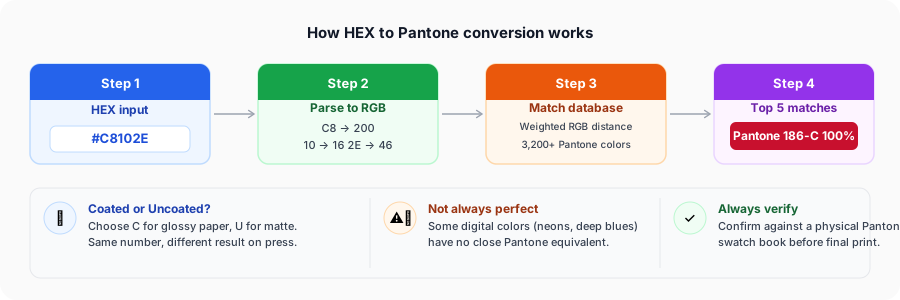
No algorithm can produce a perfect HEX-to-Pantone conversion because they represent fundamentally different color systems. What converters do is find the closest available Pantone color using a mathematical distance formula.
Here's the process step by step:
Step 1 — Parse the HEX to RGB
#C8102E → rgb(200, 16, 46)
Step 2 — Compare against the Pantone database Every Pantone color can be approximated with a HEX/RGB value. The algorithm calculates the perceptual distance between your input and every color in the database.
Step 3 — Rank by similarity Colors are ranked from closest to furthest. The top result is the "best match" — but it may still be visually different, especially for saturated or unusual colors.
Step 4 — Return top matches A good converter returns the top 5 matches so you can choose based on context — for example, preferring a slightly different hue that better fits your brand's overall palette.
The algorithm limitation: Perceptual color distance in RGB space doesn't perfectly match how human eyes perceive color differences. A weighted RGB formula (giving more weight to green, which eyes are most sensitive to) produces better results than plain Euclidean distance — which is the approach PantoneConverter.com uses.
Step-by-Step: Converting HEX to Pantone
Step 1 — Find your HEX code
Your HEX code could be in:
- Figma or Sketch (click the color picker, copy the HEX value)
- Brand guidelines PDF (look for the digital/web color specification)
- CSS stylesheet (
color: #C8102E) - Photoshop color picker
Make sure you have the full 6-character code. If you only have an RGB value, use our RGB to Pantone converter instead.
Step 2 — Enter it into the converter
Go to HEX to Pantone Converter. Paste your code with or without the # prefix — both work.
The large color preview box will immediately show your color. This is useful for a sanity check — if the preview looks wrong, double-check your HEX code.
Step 3 — Choose Coated or Uncoated
Before reviewing results, select the correct paper type:
- Coated (C) — glossy or silk paper, packaging, magazines. Colors appear more saturated and vibrant.
- Uncoated (U) — matte paper, letterheads, notebooks. Colors appear softer and slightly duller.
Not sure which to use? Ask your print supplier what paper stock they're using and whether it's coated or uncoated. When in doubt, request a printed proof with both variants.
Step 4 — Review the top 5 matches
Don't automatically take the #1 result. Look at all five:
- Similarity % — higher is closer, but even 90%+ can be visually noticeable
- Color swatch — compare the rendered swatch to your original color
- Pantone name — recognizable names like "Reflex Blue" or "Process Black" are industry standards your printer will know immediately
Step 5 — Verify with a physical swatch book
This step is non-negotiable for professional print work. Your monitor displays colors using backlit pixels — Pantone colors are printed inks on paper. They will always look different on screen.
The Pantone Formula Guide (Coated & Uncoated) is the industry standard reference. If you work with print regularly, it's worth owning one. They're updated periodically as Pantone adds new colors.
Common HEX to Pantone Mistakes
Mistake 1 — Using the wrong substrate variant Specifying Pantone 186 C when the job is on uncoated paper. Always match C/U to your actual paper.
Mistake 2 — Trusting screen previews The Pantone swatch you see on screen is an RGB approximation of the real ink. It's directionally correct but not accurate. Physical swatch is the only truth.
Mistake 3 — Ignoring the similarity score A 75% match means the colors are noticeably different. If no Pantone color matches above 85%, consider whether spot Pantone is the right choice — sometimes a well-calibrated CMYK mix is more accurate for unusual hues. Our HEX to CMYK converter gives you a starting CMYK build for the same code to discuss with your printer.
Mistake 4 — Forgetting that some colors have no good Pantone match Very saturated digital colors — electric blues, neon greens, pure white — often don't have close Pantone equivalents in the standard Solid library. Check the Pastels & Neons library for fluorescent colors.
HEX to Pantone for Brand Guidelines
If you're creating or updating brand guidelines, you should document colors in all three systems:
| Format | Example | Used For |
|---|---|---|
| HEX | #C8102E | Web, digital, CSS |
| RGB | 200, 16, 46 | Screen design tools |
| CMYK | 0, 92, 77, 22 | General commercial print |
| Pantone | 186 C | Brand-critical spot color print |
This ensures any designer or vendor can work with your brand color in any context without needing to convert themselves.
Frequently Asked Questions
Related Tools
Same Screen Colour, Different Destinations
A HEX code is a screen value, and Pantone PMS is only one of the places it can land.
If you picked the colour from a design-tool colour picker rather than a stylesheet, you may find HSV to Pantone more direct — those are the H, S and B numbers Photoshop and Figma show — and Pantone to HSV works back the other way for building tints and shades.
If the colour is destined for apparel or interiors, PMS is the wrong Pantone library. Fashion
uses a separate system whose codes look like 19-4052 TCX, and HEX to TCX is the
conversion your mill actually needs; TCX to HEX covers the reverse for ecommerce
swatches and lookbooks.
And if it is being manufactured rather than printed, convert onward from the Pantone result: RAL for coatings, DMC for thread, Oracal 651 for cut vinyl.
Finally, the reverse direction is worth bookmarking alongside this one. Once a brand has settled on a PMS number, everyone downstream needs its screen value rather than its match score — and the Pantone to HEX converter returns that for any of the 3,679 colours, with a 100-colour PMS to HEX chart, WCAG contrast ratios for each one, and a table showing how far the coated and uncoated hex codes really are apart.