Pantone is a standardized color matching system used across print, fashion, product design, and manufacturing to ensure that colors appear exactly the same regardless of the printer, material, or country of production. When a brand says their red is Pantone 186 C, every printer in the world knows precisely which ink to mix — no guesswork, no variation.
The Problem Pantone Solves
Imagine designing a logo with a specific shade of red. You create it on your screen in RGB. The client approves it. But when the business cards come back from the printer, the red looks orange. When the packaging arrives from a different supplier, it looks almost maroon.
This happens because screen colors (RGB) and print colors (CMYK) behave differently, and even two printers using the same CMYK formula can produce visibly different results depending on ink brand, paper stock, and press calibration.
Pantone solves this by removing the formula entirely. Instead of telling a printer "mix 0% cyan, 100% magenta, 81% yellow, 11% black," you simply say "use Pantone 186 C." The printer buys a pre-mixed Pantone ink — exactly the same ink, manufactured to the same specification — and the color is guaranteed.
Key insight: Pantone colors are pre-mixed spot inks, not combinations of CMYK. This is why they're more consistent and why some Pantone colors — especially neons and metallics — simply cannot be reproduced in CMYK at all.
How the Pantone Matching System (PMS) Works
The Pantone Matching System (PMS) is a proprietary numbering system where every color has a unique code. The code tells you both the color and its intended substrate:
| Suffix | Meaning | Use Case |
|---|---|---|
| C | Coated | Glossy/coated paper — colors appear more vibrant |
| U | Uncoated | Matte/uncoated paper — colors appear slightly duller |
| M | Matte | Matte-coated paper |
| CP | Coated (Process) | CMYK simulation on coated stock |
So Pantone 186 C and Pantone 186 U are the same color family — but they look different when printed because ink absorbs differently into coated vs. uncoated paper.
Pantone Color Libraries
Pantone publishes several distinct color libraries for different industries:
- Pantone Solid/Spot Colors — the core library used in graphic design and brand work. Over 2,600 colors available in Coated and Uncoated variants. The newest of them are the 224 colors Pantone added in 2026.
- Pantone Metallics — 301 metallic spot colors for premium packaging and luxury branding.
- Pantone Pastels & Neons — soft pastels and fluorescent neons that can't be replicated in CMYK.
- Pantone Fashion, Home + Interiors (FHI) — used in textile, apparel, and interior design. Different numbering system from graphic design colors.
- Pantone Skin Tone Guide — used in photography, cosmetics, and healthcare.
For most graphic designers and brand managers, the Solid Coated and Uncoated libraries are what matter.
Why Brands Use Pantone
Brand color consistency is not cosmetic — it's commercial. Studies consistently show that consistent brand colors increase brand recognition by up to 80%. Coca-Cola's red is commonly cited as Pantone 484 C, and a brand like that needs the same color on cans, bottles, trucks, uniforms, and billboards across 200 countries.
This is only possible with a standardized spot color system.
Companies that rely heavily on Pantone:
- Consumer brands with strong color identities (Tiffany's robin egg blue is Pantone 1837)
- Packaging designers where color accuracy affects purchase decisions
- Sports teams whose jersey colors must match across manufacturers
- Government and flag printing where color is legally specified
Pantone vs. CMYK vs. RGB
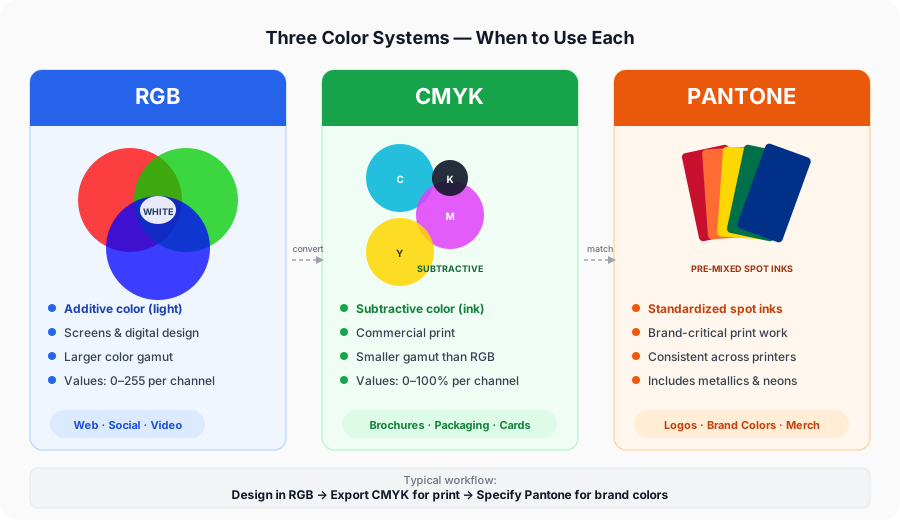
Understanding when to use each system is fundamental design knowledge:
| System | Best For | How It Works |
|---|---|---|
| RGB | Screens, digital design | Light-based, additive — combining R, G, B produces white |
| CMYK | General commercial printing | Ink-based, subtractive — combining C, M, Y, K produces black |
| Pantone | Brand-critical print work | Pre-mixed spot inks — one ink, one exact color |
The workflow for most brand projects goes: design in RGB → convert to CMYK for general print → specify Pantone for brand-critical elements.
When you convert CMYK to Pantone or convert HEX to Pantone, you're finding the closest pre-mixed Pantone ink to your digital color — which is the critical last step before sending files to a professional printer.
Important: No conversion tool — including ours — produces a perfect match. CMYK and RGB are mixed-ink or light approximations. The only way to verify a Pantone color is to compare it against a physical Pantone swatch book under proper lighting.
Pantone and Adobe: What Changed in 2022
In August 2022, Pantone and Adobe ended their licensing agreement. As a result, Pantone color libraries were removed from Adobe Creative Cloud applications including Photoshop, Illustrator, and InDesign. Designers who previously relied on built-in Pantone swatches now need a paid Pantone Connect subscription ($14.99/month) to access them within Adobe software.
This created significant demand for free, browser-based Pantone conversion tools — which is exactly what PantoneConverter.com provides.
How to Use Pantone Colors in Your Workflow
Step 1 — Identify your brand color Start with your hex code or RGB value from your brand guidelines.
Step 2 — Find the closest Pantone match Use our HEX to Pantone converter or RGB to Pantone converter to find the closest PMS color. Check both Coated and Uncoated results.
Step 3 — Verify against a physical swatch Order or borrow a Pantone Formula Guide. Digital screens cannot accurately display Pantone colors — only physical swatches can be trusted for final color decisions.
Step 4 — Specify in your files In Illustrator or InDesign, create a spot color swatch with the exact Pantone name (e.g., "Pantone 186 C"). This tells the printer to use spot ink rather than CMYK simulation.
Step 5 — Communicate with your printer Always include the full Pantone code (number + C or U suffix) in your print brief. Never assume the printer will infer the correct substrate variant.
Explore Pantone by Color Family
Looking for a specific shade? We've compiled comprehensive guides for every major Pantone color family, complete with hex codes, CMYK values, and brand examples:
Pantone Red | Pantone Blue | Pantone Green | Pantone Yellow | Pantone Orange | Pantone Pink | Pantone Purple | Pantone Gold | Pantone Black | Pantone White
Frequently Asked Questions
Related Tools
Find the closest Pantone match for any HEX color code.
Convert CMYK print values to the nearest PMS color.
Match screen RGB values to Pantone spot colors.
Browse and search 3,600+ approximate PMS colors.
Match Pantone to RAL Classic paint and powder-coating codes.
Translate Pantone into Natural Colour System notation.
Device-independent CIELAB values used for measurement and ΔE.
Pantone Is Not the Only Colour Standard
Pantone dominates print and branding, but it is one system among several, and each industry tends to have its own. European paint and powder coating runs on RAL, Scandinavian architecture on NCS, German offset printing on HKS, Japanese printing on TOYO, US defence and aerospace on Federal Standard 595, and process-only print work on Trumatch. Underneath all of them sits CIELAB, the device-independent space that colour measurement and ΔE tolerances are actually calculated in.
Because these systems use different colourants on different substrates, converting between any two of them is a nearest-match exercise rather than a lookup — which is why every cross-standard result on this site carries a ΔE figure telling you how close the substitute really is. For a fuller comparison of the three you are most likely to meet, see RAL, NCS and HKS versus Pantone, which sets out which standard belongs to which industry and how close the conversions actually land.