Most designers pick up these four models by osmosis — RGB from CSS, HSL from a color picker, LAB from a Photoshop menu nobody explains. That works right up until two of them disagree, and then it is very unclear which one to believe.
Here is the same color, one blue, written four ways:
| Model | Value |
|---|---|
| RGB | 29, 79, 145 |
| HSL | 214°, 67%, 34% |
| HSV | 214°, 80%, 57% |
| LAB | L* 33.8, a* 8.3, b* −41.2 |
Same pixel, four descriptions. The hue agrees. Everything else disagrees, including the two numbers that both sound like "how saturated is it". This article is about why, and about which of the four to hand a converter when you want a Pantone match you can trust.
What Is a Color Space, and Why Do So Many Exist?
A color model is a coordinate system for color: a set of axes, so any color becomes a set of numbers. A color space is a model plus a definition of what those numbers physically mean — sRGB is the RGB model pinned to specific primaries and a specific white point.
They multiplied because each one optimizes for a different job:
- RGB matches how a display physically works — three emitters, added together.
- HSL and HSV rearrange RGB into axes a human can steer. Nobody thinks "add 40 green"; people think "same color, a bit lighter".
- LAB models how the human eye actually responds, deliberately ignoring how any device produces the color.
None is more correct than the others. They answer different questions, and the mistake is asking one of them a question it was not built for.
RGB — the Additive, Device-Based Model
RGB describes a color as amounts of red, green and blue light, 0–255 each. It is additive: the channels add together, all three at full gives white, all at zero gives black. That is a direct description of how a screen works, which is why it is the native language of the web, and why #1D4F91 is just those three numbers in hexadecimal.
Its limitation is that RGB is device-dependent. 255, 0, 0 means "drive the red emitter fully" — and what that looks like depends on the panel, its calibration and its color profile. Without an attached profile like sRGB, an RGB triplet is an instruction, not a color.
It is also perceptually lumpy. The numeric distance from #000000 to #0000FF equals the distance from #000000 to #FFFF00, but pure yellow is dramatically brighter to the eye than pure blue. Any matching built on raw RGB distance inherits that distortion — which is why our RGB to Pantone converter converts into a perceptual space before it ranks anything, and why Pantone to RGB is only ever giving you a screen approximation of an ink.
HSL — Hue, Saturation, Lightness
HSL keeps the same colors and re-parameterizes them into axes you can reason about:
- Hue — position on the color wheel,
0–360°. Red at 0, green at 120, blue at 240. - Saturation —
0–100%, from gray to fully vivid. - Lightness —
0–100%, where 0% is black, 100% is white, and 50% is where fully saturated colors live.
That last point is the one people miss. In HSL, cranking lightness past 50% does not make a color more vivid; it washes it toward white. hsl(0, 100%, 50%) is pure red, and hsl(0, 100%, 100%) is plain white.
HSL is what CSS uses, and it is genuinely good for building systematic palettes — hold hue and saturation, step lightness, and you get a coherent tint ramp. The HSL to Pantone converter takes these values directly if that is where your design tokens live.
HSV / HSB — Hue, Saturation, Value (Brightness)
HSV shares the hue axis and then diverges. Its third axis is Value (Photoshop calls it Brightness, hence HSB — same model, two names):
- Value —
0–100%, where 0% is black and 100% is as bright as that hue gets.
The difference is structural, not cosmetic. In HSV, V = 100% is the top of the space, and white is what you get at V = 100% with saturation at zero. Full value with full saturation gives you the pure hue. In HSL, white is a destination of its own that any color reaches at L = 100%, regardless of saturation.
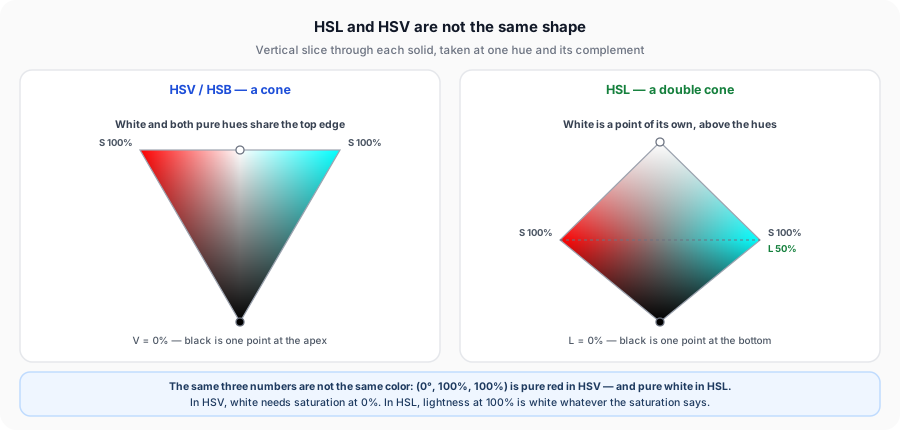
The practical consequence is that identical numbers produce different colors:
| Written as | Read as HSL | Read as HSV |
|---|---|---|
(0°, 100%, 100%) | #FFFFFF — white | #FF0000 — pure red |
(0°, 100%, 50%) | #FF0000 — pure red | #800000 — dark red |
(210°, 60%, 70%) | #85B3E0 | #477DB3 |
(0°, 0%, 100%) | #FFFFFF | #FFFFFF |
Only the last row agrees. If you copy three numbers out of a tool that speaks HSV into a field that expects HSL, nothing errors — you simply get a different color. That is the single most common way this pair causes a real problem, and it is why the HSV to Pantone converter is a separate tool rather than a relabeled one.
A quick way to tell which one you are looking at: drag saturation to zero with the third slider at maximum. If you land on white, it is HSV. If you stay on your color at full brightness, it is HSL. Photoshop's square picker is HSV; the CSS hsl() function is, as the name says, HSL.
LAB — the Perceptually Uniform, Device-Independent Model
CIELAB was built in 1976 to do something neither RGB nor its rearrangements attempt: make numeric distance correspond to perceived difference. Its axes are:
- L* — lightness,
0(black) to100(white). - a* — green to red.
- b* — blue to yellow.
Two properties make it the model color scientists actually trust.
First, it is device-independent. LAB coordinates are defined against a standard illuminant and a standard observer — our conversions use D65 with the 2° observer, which is exactly what Pantone, RAL and NCS all publish their own LAB values against. A LAB value describes a color, not an instruction to a device.
Second, it is perceptually uniform, and the clearest way to see what that buys you is to compare it against HSL on the one axis they both claim to measure:
| Color | HSL lightness | LAB L* |
|---|---|---|
Pure blue #0000FF | 50% | 32.3 |
Pure red #FF0000 | 50% | 53.2 |
Pure green #00FF00 | 50% | 87.7 |
Pure yellow #FFFF00 | 50% | 97.1 |
All four are "50% lightness" in HSL. To the human eye they run from quite dark to nearly as bright as white — a span of 65 points in LAB. HSL's lightness is a geometric position in a cylinder; LAB's L* is a measurement of what you see. Any calculation about how different two colors look has to happen in a space like the second one, which is why the LAB to Pantone converter is the most precise entry point on this site.
This is also where ΔE*00 comes from — the color-difference figure shown beside every match here is computed in LAB, because it is the only one of these four spaces where such a number would mean anything.
CSS now has a perceptual model for screen color too, OKLCH; the HEX to OKLCH converter shows any hex code's lightness, chroma and hue.
Comparison Table
| Model | Device-Dependent? | Best Used For | Human-Perceptual Accuracy |
|---|---|---|---|
| RGB | Yes — needs a profile such as sRGB | Screen output, web and UI code, image data | Poor — equal numeric steps look very unequal |
| HSL | Yes — a re-parameterization of RGB | Building tint and shade ramps, CSS, design tokens | Poor — "50% lightness" spans black-dark to near-white |
| HSV / HSB | Yes — a re-parameterization of RGB | Color pickers, painting and illustration software | Poor — same limitation, plus value ≠ brightness |
| LAB | No — defined against a standard observer | Measuring difference, matching across media, ΔE | High — built so numeric distance tracks what you see |
Why None of These Are "Native" to Pantone
Every model above is a computed space: give it coordinates and it defines a color mathematically. Pantone is not that. A Pantone color is a physical library — a specific ink, mixed to a published recipe from a set of base inks, printed on a specified paper, with a physical chip as the reference standard.
There is no formula that turns coordinates into a Pantone number, because a Pantone number is not a point in any space. It is an index into a catalog of manufactured objects. Every conversion on this site is therefore a nearest-neighbor search: convert your color into a perceptual space, convert every Pantone ink into the same space, and rank by distance.
This is the same reason converting between CMYK and RGB is lossy in a different way — CMYK is a computed space, but a much smaller one, so colors fall outside it and get clipped. With Pantone, nothing gets clipped; you simply land on the nearest manufactured ink and get told how far away it was.
The sRGB values shown for Pantone colors — here and everywhere else online — are approximations of an ink under one set of viewing conditions. Many Pantone inks, particularly the neons and metallics, sit outside what any screen can display at all. The chip is the standard; the hex code is a label for it.
Which Model Should You Convert From for the Most Accurate Pantone Match?
LAB, whenever you have it. The reasoning is short: matching means ranking by perceived difference, that ranking happens in LAB, and every other model has to be converted into LAB first. Starting in LAB skips a conversion and, more importantly, skips a guess — an RGB triplet without a profile has to be assumed to be sRGB before it can go anywhere.
In practice the hierarchy runs:
- LAB — if your value came off a spectrophotometer, a brand guideline's technical appendix, or a measured sample, use it directly.
- RGB or HEX — the realistic default. Fine, as long as you know the value is sRGB, which for web colors it essentially always is.
- HSL or HSV — perfectly usable, but they convert to RGB first, so they carry the same assumption with an extra step. Use them when that is genuinely where your value lives.
What matters more than the entry point is reading the ΔE figure that comes back. A match found from a pristine LAB value is still only as good as the nearest available ink, and the number tells you which of those two things you are looking at.
Frequently Asked Questions
Related Tools
The most precise entry point — device-independent L*a*b* values.
Match screen RGB values to the closest Pantone spot color.
Convert hue, saturation and lightness straight to a PMS match.
For values taken from a Photoshop or illustration color picker.
Get the CIELAB coordinates behind any Pantone color.
Lightness, chroma and hue of any hex code as a CSS oklch() value.
See what a given ΔE*00 difference actually looks like.
Convert from whichever model you have
Start from LAB if you have it, RGB if you do not. Every result is ranked by ΔE*00 and runs entirely in your browser.